
Mesh Networks vs. Traditional Routers: What the Difference Means for a Multi-Room Home

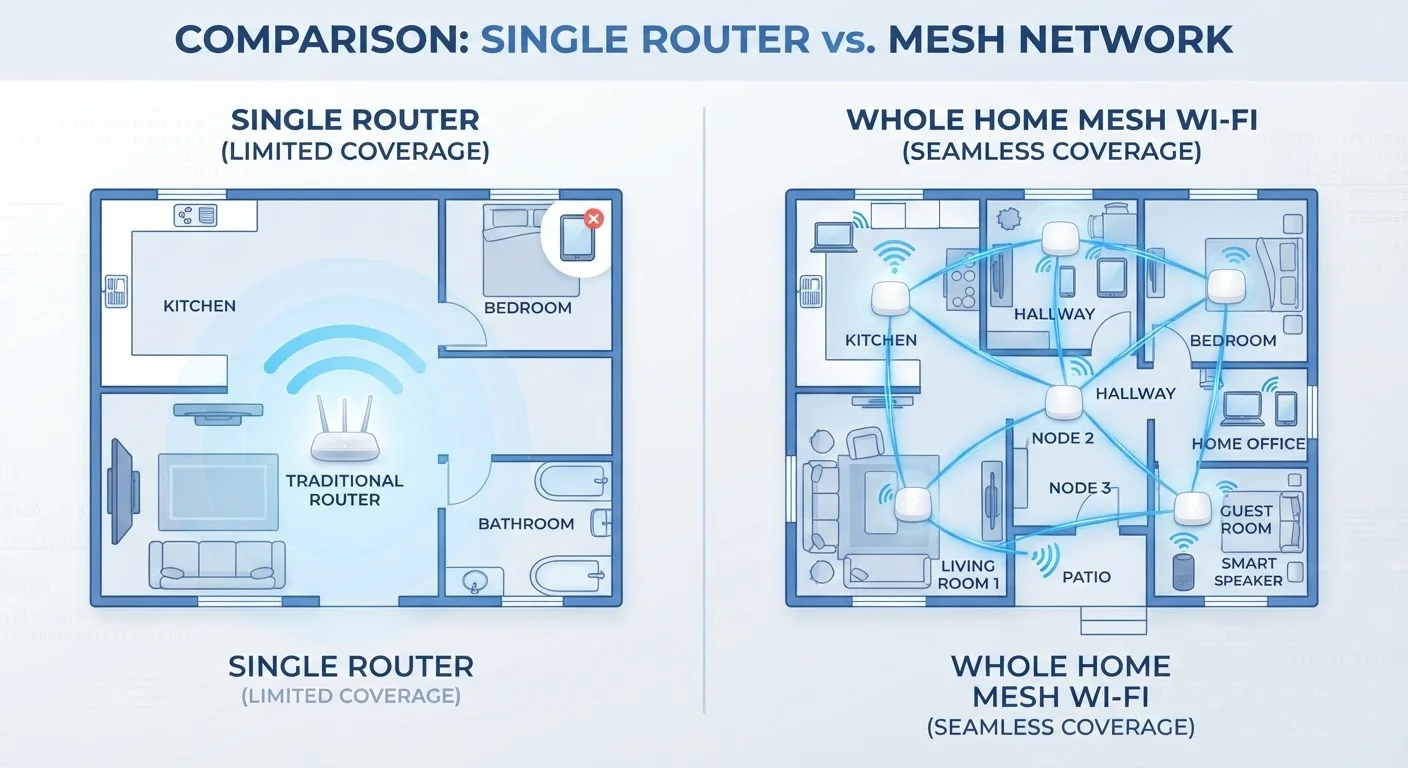
Photo: AdvisorBooth.net editorial
Key Takeaways
- A traditional router broadcasts Wi-Fi from a single point; signal strength falls off with distance and obstacles.
- A mesh system uses multiple linked nodes to blanket a home in overlapping Wi-Fi coverage.
- Mesh networks handle device handoffs automatically, so your phone stays connected as you move between rooms.
- Traditional routers are simpler to set up and typically cost less upfront than a mesh kit.
- Home size, layout, and number of connected devices are the key factors when choosing between the two.
- Placement matters for both systems - even a mesh setup benefits from thoughtful node positioning.
How Each System Actually Works
A traditional router connects to your modem and broadcasts a Wi-Fi signal outward in all directions from one fixed point. Think of it like a single lightbulb in the center of a house - the closer you are, the brighter the light. As you move farther away, or as walls and floors absorb the signal, coverage dims. For a deeper look at what routers and modems each do, the Home Network Glossary covers both in plain English.
A mesh network system replaces that single point with a team of devices called nodes. One node connects to your modem and acts as the primary hub; the others - placed in hallways, on upper floors, or near far rooms - receive and rebroadcast the signal. The nodes communicate with each other constantly, forming a seamless web of coverage. Your devices see a single network name and jump between nodes automatically as you move around, without you needing to manually switch connections.
The core difference is architecture: one central source versus a distributed web of sources working together.
| Criterion | Traditional Router | Mesh Network System |
|---|---|---|
| Coverage approach | Single broadcast point | Multiple distributed nodes |
| Typical coverage area | Up to ~1,500 sq ft | 3,000+ sq ft (scalable) |
| Device handoff as you roam | Not supported | Automatic and seamless |
| Setup complexity | Low - one device | Moderate - multiple nodes to place |
| Upfront hardware cost | Generally lower | Generally higher |
| Dead zone risk | High in large or complex layouts | Low when nodes are well placed |
| Management app | Varies by model | Typically included |
Where Traditional Routers Fall Short in Larger Homes
Wi-Fi signal degrades through distance and physical barriers. Concrete walls, brick, large appliances, and even dense furniture all absorb and scatter radio waves. A router placed in a living room may deliver fast speeds to the couch directly in front of it while leaving a back bedroom or basement with a weak, unreliable signal - or no signal at all.
These weak spots are called dead zones, and they're the most common complaint homeowners report about their home Wi-Fi. Moving the router can help, but it rarely solves the problem entirely in a home with multiple floors or a sprawling footprint. Our article on router placement mistakes explains why position matters so much and what most people get wrong.
Connecting more devices also strains a single router. A household running smart TVs, security cameras, laptops, phones, and smart home gadgets can push a single router toward its capacity limits, causing slowdowns for everyone on the network.
~30%
Signal lost through a single interior wall
Radio frequency attenuation studies indicate a standard drywall interior wall can reduce Wi-Fi signal strength by roughly 30%, with concrete or brick causing far greater losses.
25+
Average connected devices per U.S. household
According to Deloitte's Digital Media Trends research, U.S. households have been steadily surpassing 20-25 connected devices, increasing strain on single-router setups.
2x
Typical node count for a 3,000 sq ft home
Most mesh system manufacturers recommend at least two nodes for homes in the 2,500-3,500 square foot range to maintain reliable backhaul between units.
What Mesh Systems Do Differently - and What They Don't Fix
Mesh systems address the coverage problem directly. By spreading nodes through the home, they shrink the distance between any given device and its nearest access point. That shorter distance means stronger signal, faster speeds, and fewer dropped connections.
One practical advantage is seamless roaming. When you carry a phone from the kitchen to the upstairs office, a mesh system quietly hands it off to the nearest node without interrupting your video call. A traditional router can't do that - there's only one access point, so devices at the edge of range simply stay on a weak connection.
Mesh systems also tend to have companion apps that make it easier to see which devices are connected, set usage limits for specific devices, and run speed diagnostics per node. Understanding how the underlying Wi-Fi bands work can further help you optimize any network setup - see 2.4 GHz vs. 5 GHz Wi-Fi for a breakdown.
However, mesh systems are not magic. They cannot exceed the speed your internet service provider delivers to your home. If your broadband plan is slow, a mesh system will spread that slow connection efficiently - but it won't make it faster. Node placement still matters: nodes too far apart or separated by too many walls will struggle to maintain a strong backhaul (the connection between nodes themselves).
If your home integrates smart speakers, hubs, and other connected devices, it also helps to understand how those fit into a network - the Smart Home Hub guide is a useful companion read.
Which Setup Fits Your Home?
The honest answer depends on three things: your home's size, its construction, and how many devices you're running.
For homes under roughly 1,500 square feet with open layouts, a single well-placed router is usually sufficient. The key word is well-placed - centrally located, elevated off the floor, and away from interference. Many people never explore this option fully before concluding they need an upgrade.
For homes above 2,000 square feet, multi-story layouts, or homes with older construction (thick plaster walls, concrete floors), a mesh system is often the more practical path to consistent coverage. The same applies if your household runs 20 or more connected devices simultaneously.
Cost is a real factor too. A capable single router typically costs less upfront than a two- or three-node mesh kit. But if you've already bought Wi-Fi extenders (plug-in devices meant to stretch a router's signal) and still have dead zones, a mesh system is generally a more reliable long-term solution - extenders tend to create separate networks and can actually reduce overall speeds if not configured carefully.
Whatever you choose, the foundation is your internet connection itself. For a grounded overview of how Wi-Fi compares to wired and mobile options, Wi-Fi, Ethernet, and Cellular puts each in context.
The content on this site is for informational purposes only and is not a substitute for professional advice. Always consult a qualified professional for guidance specific to your situation.