
Fiber, Cable, DSL, and Satellite: How Each Internet Technology Delivers Data to Your Home

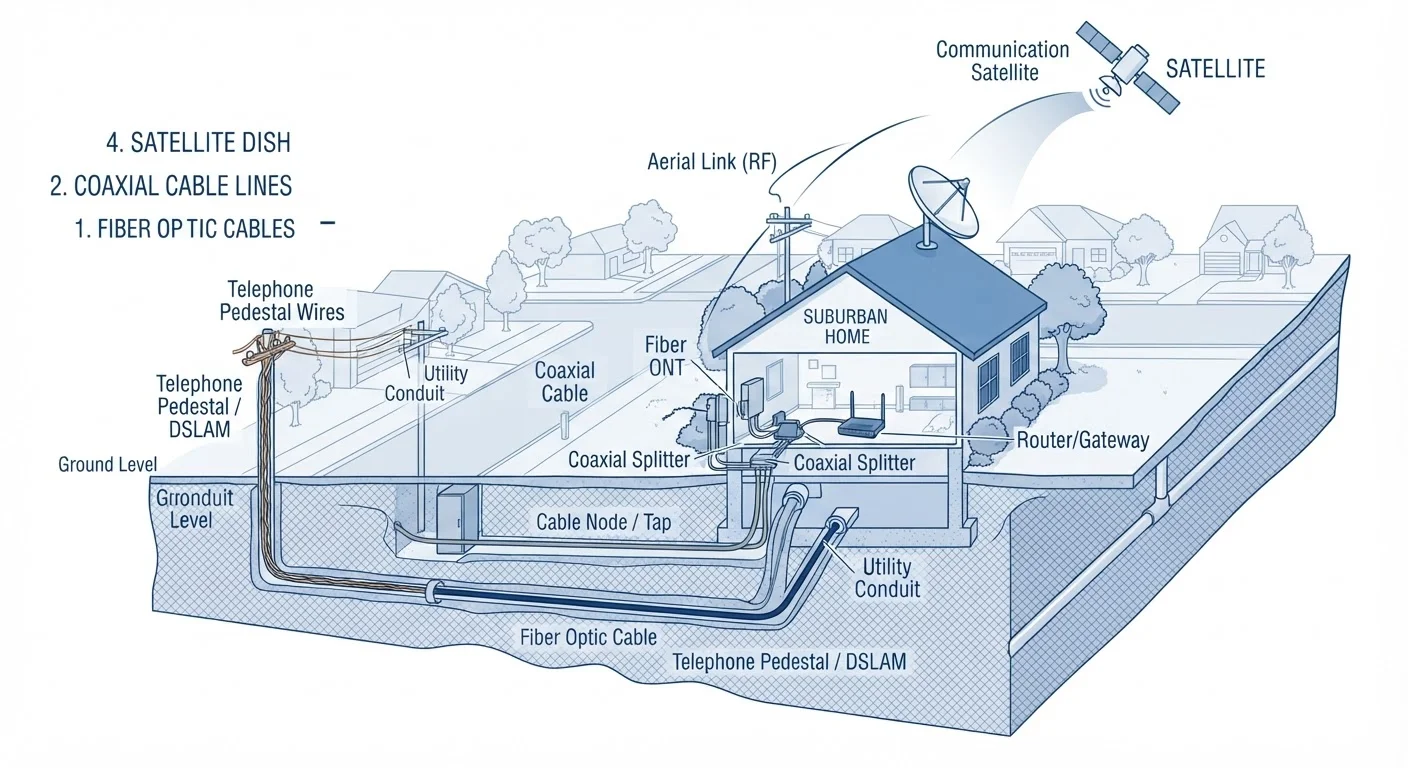
Photo: AdvisorBooth.net editorial
Key Takeaways
- Fiber uses light through glass strands, delivering the fastest and most symmetrical speeds available to consumers.
- Cable internet shares neighborhood bandwidth over coaxial lines, making speeds variable during peak hours.
- DSL travels over existing phone lines and is widely available but tops out at lower speeds than cable or fiber.
- Satellite covers remote areas no other technology reaches, but high latency makes real-time applications difficult.
Why the Physical Path Matters
When you stream a video or send an email, data travels through a physical medium before it ever reaches your router. The type of medium - glass fiber, coaxial cable, copper phone wire, or radio waves bouncing off a satellite - determines how fast that data moves, how reliably it arrives, and how far it can realistically reach.
Understanding these differences helps explain why two neighbors in different parts of town can pay similar monthly rates and get dramatically different experiences. It also clarifies why geographic availability varies so sharply across the country. For a broader introduction to how home internet works end-to-end, see Everything Beginners Should Know About Home Internet.
| Fiber | Cable | DSL | Satellite | |
|---|---|---|---|---|
| Transmission medium | Glass/plastic optical strands | Coaxial cable | Copper phone lines | Radio waves via orbiting satellites |
| Typical download speeds | Up to 1 Gbps or more | 25 Mbps - 1 Gbps | 1 - 100 Mbps | 25 - 200 Mbps (varies widely) |
| Upload speed parity | Symmetrical (equal up/down) | Asymmetrical (upload much slower) | Asymmetrical (upload much slower) | Asymmetrical |
| Latency | Very low (1-10 ms) | Low-moderate (10-30 ms) | Moderate (25-50 ms) | High (20-600+ ms depending on orbit) |
| Rural availability | Limited, expanding | Limited outside suburbs | Moderate | Broad, including remote areas |
| Infrastructure dependency | New fiber build required | Existing cable TV wiring | Existing telephone wiring | No ground wiring needed |
Fiber: Light Through Glass
Fiber-optic internet encodes data as pulses of light and sends them through thin strands of glass or plastic. Because light travels at - well, the speed of light - fiber is the fastest consumer broadband technology available today. More importantly, it offers symmetrical speeds, meaning upload and download rates are typically equal. That matters for video calls, cloud backups, and anyone working from home.
Fiber also suffers almost no signal degradation over distance, which keeps performance consistent whether you live one block or several miles from the provider's central hub. The main limitation is infrastructure: laying fiber requires digging trenches and installing entirely new cabling, which makes it expensive to build out. As a result, availability is still concentrated in cities and growing suburbs.
Cable: Shared Lanes Over Coaxial Wire
Cable internet uses the same coaxial wiring built for cable television. It's widely deployed across suburban and urban America, making it the most common broadband type for U.S. households. Speeds are generally strong - capable of hundreds of megabits per second under the right conditions - but the architecture has a notable quirk: local customers share bandwidth on the same neighborhood segment of cable.
During peak hours (think weekday evenings), that shared capacity can cause noticeable slowdowns. Upload speeds are also typically much slower than download speeds, which is worth considering if you regularly send large files or host video calls. Understanding upload vs. download speed differences can help you assess whether a cable plan fits your household's actual usage pattern.
Test Your Speed at Different Times of Day
DSL: Internet Over Phone Lines
DSL sends digital data over the copper telephone wires already running to most American homes. Because the infrastructure already exists, DSL is available in many areas that cable or fiber haven't reached. However, copper wire has real physical limitations: signal quality degrades with distance, so homes farther from a provider's switching station receive slower speeds. Many DSL connections top out well below what cable or fiber can deliver.
For light internet users - email, basic browsing, standard-definition video - DSL can be a perfectly adequate option where it's the fastest service available. It's worth checking local availability carefully, since DSL service quality varies considerably by specific address, not just by city or zip code.
Satellite: Reaching Where Others Can't
Satellite internet bypasses all ground-based wiring entirely. A dish at your home communicates with an orbiting satellite, which relays data back to ground stations connected to the broader internet. This makes satellite uniquely valuable for rural and remote homes that wired technologies will never economically reach.
The fundamental challenge is latency - the time it takes for a signal to travel from your home up to a satellite and back down. Traditional geostationary satellites orbit roughly 22,000 miles above Earth, producing round-trip delays that make real-time applications like gaming or video conferencing frustrating. Low Earth orbit (LEO) satellite systems operate at much lower altitudes and have reduced this latency meaningfully, though it remains higher than any wired technology. Weather can also interrupt satellite signals in ways that ground-based systems don't experience.
If your connection feels unreliable regardless of the technology involved, troubleshooting a slow or dropping internet connection walks through how to diagnose the most common causes before contacting your provider.
How to Think About Your Options
Availability is the first filter - you can only choose from technologies that reach your address. Within what's available, the right choice depends on how your household actually uses the internet. Heavy streaming, remote work, and multi-device homes benefit most from fiber's speed and symmetry. Light users in areas with only DSL or satellite service can still get a functional connection by matching their plan to realistic usage.
Once you've sorted out which type of internet enters your home, the next question is how it gets distributed to your devices. Wi-Fi, Ethernet, and cellular all work differently - and understanding those differences is the natural next step. If any of the terminology above felt unfamiliar, the home network glossary offers plain-English definitions for the most common networking terms.
The content on this site is for informational purposes only and is not a substitute for professional advice. Always consult a qualified professional for guidance specific to your situation.